Turn JSON into C# classes — records with honest nullability
Paste an API payload, choose the C# target, and get sealed records with System.Text.Json field-name annotations inside your own namespace. Nested objects become named record types, whole numbers become long, and the difference between a property that is sometimes missing and one that is explicitly null survives into the generated code. Everything runs on your device.
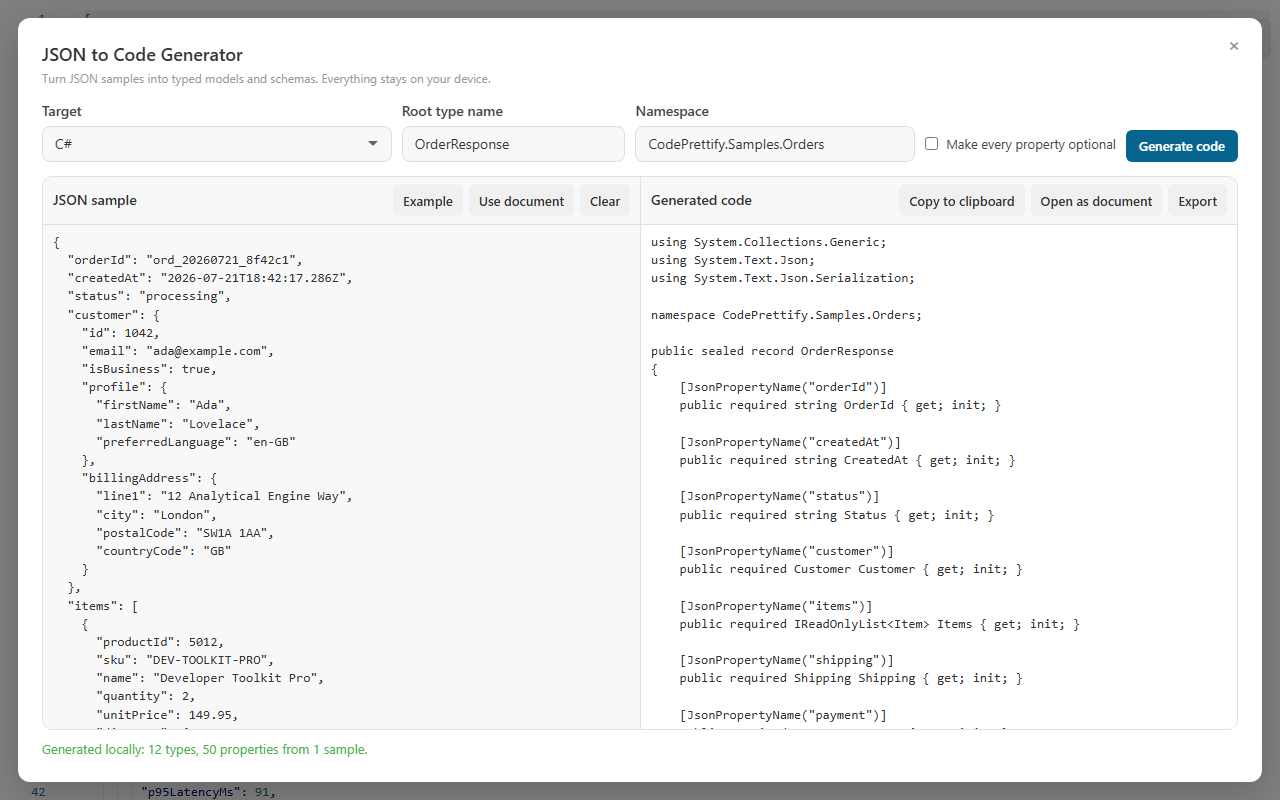
An advanced order payload — nested customer, items, shipping, and payment data — generated as annotated C# records in a project namespace, entirely locally.
C# output
From order JSON to sealed records in one pass
Two order samples are enough to show the three decisions that matter in C#: couponCode is missing from one sample, vatNumber is explicitly null in another, and orderId is a whole number. Each fact lands differently in the generated model.
JSON sample
Two orders, three kinds of evidence
Because the root is an array, every entry contributes to the merged model — not just the first record.
Property names become PascalCase, but every property carries its original JSON key in a System.Text.Json annotation, so round trips never break.
namespace Billing.Contracts;

public sealed record Order
{
    [JsonPropertyName("orderId")]
    public required long OrderId { get; init; }

    [JsonPropertyName("customer")]
    public required Customer Customer { get; init; }

    [JsonPropertyName("items")]
    public required IReadOnlyList<Item> Items { get; init; }

    [JsonPropertyName("couponCode")]
    public string? CouponCode { get; init; }
}

public sealed record Customer
{
    [JsonPropertyName("name")]
    public required string Name { get; init; }

    [JsonPropertyName("vatNumber")]
    public required string? VatNumber { get; init; }
}
i
Optional and nullable are different facts, and the C# shows it.
couponCode was absent from one sample, so it is optional — no required keyword. vatNumber was present in every sample but explicitly null in one, so it stays required with a nullable type. And items was singularized into a named Item record for its element type. None of this needed configuration; it was read from the evidence.
Hands-on tutorial
Generate a C# model from a payload you already have
Use a real response from the API you are integrating, the order sample above, or the built-in Example. The goal is a record set your project can compile immediately — with every inference decision visible before you commit to it.
Open the JSON to Code Generator
It is a general tool, so it is available from More Actions and the Command Palette for every file type; the extension also exposes it from the launcher, and the Windows app lists it under Tools. When you open it on a JSON document, the document is loaded as the sample automatically the first time, and Use document reloads it at any point.
Load a representative sample
Paste one strict JSON object, value, or array of sample records into JSON sample, or press Example to explore with the built-in payload. An array of several real records is the strongest input: variation between entries is what proves which properties are optional.
Choose the target and name the root
Set Target to C# and enter a Root type name that names your domain concept — OrderResponse or Order, not Data. Nested record names are derived from property names, so a good root name sets the tone for the whole file.
Set the Namespace
The Namespace field appears for the C# target and defaults to Generated. Replace it with your project namespace, such as CodePrettify.Samples.Orders — invalid entries are normalized automatically, so a stray character never produces code that will not compile.
Decide about “Make every property optional”
Leave the checkbox off to keep evidence-based required properties. Turn it on when you are modeling partial updates or sparse responses: it goes beyond adding ? and uses nullable or boxed forms where C# needs them, so value types are handled correctly too.
Generate and read the summary
Press Generate code, or Ctrl+Enter directly in the sample box. The generated code appears live beside the sample together with any inference warning, and the status line reports the local result — for example “Generated locally: 12 types, 50 properties from 1 sample.”
Check the properties that had mixed evidence
Find every property without required and every nullable type, and confirm the sample justifies each one. If a property became optional only because your sample set was thin, add another real record rather than editing the output by hand — regenerating is cheaper than maintaining manual patches.
Take the result into your project
Copy to clipboard for a quick paste, Open as document to review it in CodePrettify, or Export to save a .cs file. Then compile it and round-trip a real payload through JsonSerializer — the annotations preserve the exact source keys, so deserialize-then-serialize should reproduce your data.
Practice: prove each inference rule to yourself
Regenerate after each small change to the order sample above and confirm the C# reacts the way this page claims.
Remove couponCode from the first record too — it should disappear from the model entirely.
Make vatNumber a string in both records — the nullable ? should vanish while required stays.
Check that orderId generated as long, not int — whole numbers map to 64-bit integers.
Inspect the type chosen for unitPrice and decide whether your domain needs decimal for money — that is a business rule no sample can prove.
Rename items to addresses and watch the element record become Address.
Empty both items arrays and read the informational warning about unknowable element types.
Inference into C#
How JSON shapes map into C#
The same inference engine drives every target, but the C# output makes specific, deliberate choices so the generated file is idiomatic .NET rather than translated JSON.
Modern record declarations
Sealed records with init-only properties
required on properties every sample contained
IReadOnlyList<T> for arrays
The using directives included at the top
Exact source keys, always
System.Text.Json field-name annotations on every property
PascalCase member names without breaking round trips
Keys like user-id and reserved words get the annotation instead of a changed JSON contract
Namespace support
Defaults to Generated
Invalid entries normalized automatically
Declarations arrive ready to compile in your project
Optional vs nullable
Missing in some array samples → optional
Explicit null → nullable
All array entries merge into one model
“Make every property optional” uses nullable or boxed forms where C# needs them
Invalid JSON reports line and column when available
Generation never leaves the device
Target switching
Same sample, different backend: flip C# to TypeScript
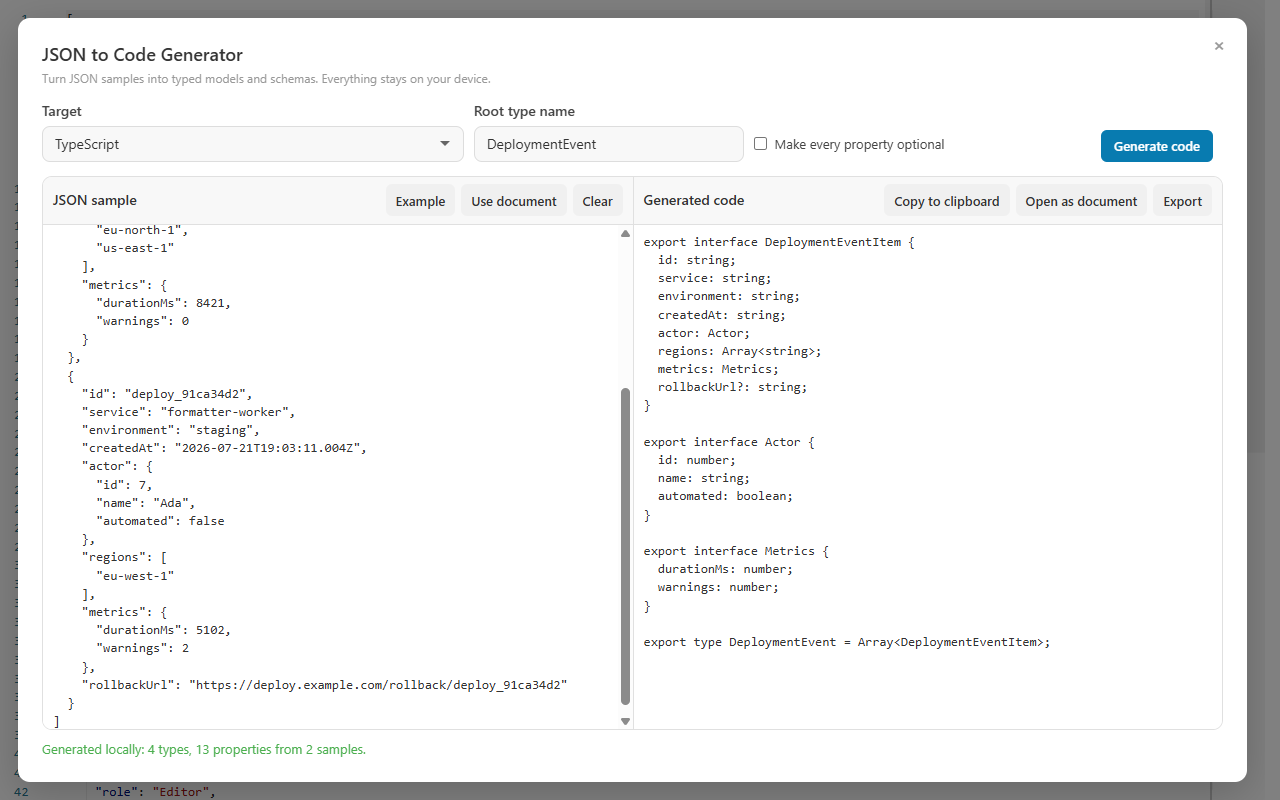
The Target dropdown regenerates from the same sample, so the frontend model for the same payload is one selection away. The inferred shape stays consistent — an optional property in the C# record is an optional property in the TypeScript interface — only the language idiom changes.
The identical workflow with TypeScript selected: nested exported interfaces with evidence-based optional fields.
C# and TypeScript are two of eleven targets — Zod, Pydantic, Java, Kotlin, Go, Rust, Swift, Dart, and JSON Schema are the rest. The JSON to Code Generator guide compares outputs across targets from one multi-sample payload; this page stays focused on what lands in your .cs file.
Review guide
When the generated C# surprises you
Every surprising line in the output traces back to either evidence in your sample or a deliberate generator rule. This table maps the common surprises to their causes — and to the fix that addresses the cause instead of patching the symptom.
What you see
Why it happened
Best next action
Every whole number is long, not int
Integers map to 64-bit types so IDs and counters cannot overflow silently.
Keep long unless you can prove the range; narrowing is a deliberate edit, not a default.
A property has no required keyword
At least one record in the sample array omitted it, so it was inferred optional.
Confirm the API contract; if the property is actually mandatory, add a more complete sample and regenerate.
required string? on one property
The property appeared in every sample but was explicitly null in at least one — nullable, not optional.
Decide what null means in your domain before replacing it with a default value.
The element type of items is named Item
Plural array property names are singularized when naming element record types.
Rename to your domain vocabulary if the singular form misses — OrderLine may say more than Item.
The namespace differs from what you typed
Invalid namespace entries are normalized automatically so the file still compiles.
Enter a valid C# namespace like Company.Project.Contracts and regenerate.
Generation refuses the sample
A limit was reached — 5 Mi characters in, 16 Mi out, 100 nesting levels, or 100,000 values — or the JSON is invalid, reported with line and column when available.
Trim the sample to representative records or fix the JSON; limits fail closed and never alter the source document.
FAQ
JSON to C# questions
Does it generate C# classes or records?
It generates records: sealed record types with System.Text.Json field-name annotations and required, init-only properties. There is no separate class mode. If your codebase standardizes on classes, the properties and annotations carry over with minimal editing, because the JSON mapping lives in the annotations, not in the record keyword.
How does the Namespace field work?
Every generated declaration is placed in the namespace you enter, so the code compiles in the right project context immediately. The field defaults to Generated, and invalid entries are normalized automatically instead of producing code that will not compile.
Are Newtonsoft.Json attributes supported?
No. The C# target emits System.Text.Json annotations only — JsonPropertyName on each property. If your project uses Newtonsoft.Json, swap the annotations for JsonProperty after generation; the record structure and property names transfer unchanged.
Is my JSON uploaded to a server?
No. Generation runs entirely on the device, in both the browser extension and the Windows app, and no account is required. The sample you paste never leaves your machine.
Generate the C# model where the JSON already lives
Open the payload, choose C#, set your namespace, and export annotated records that compile on the first try — without the sample ever leaving your machine.