JSON to TypeScript interfaces, generated from the payload you already have
Paste a strict JSON sample — or use the document already open — choose the TypeScript target, and get nested exported interfaces plus a root type alias with unions, optional fields, and your exact source keys. Every record in the sample counts as evidence, and inference runs entirely on your device.
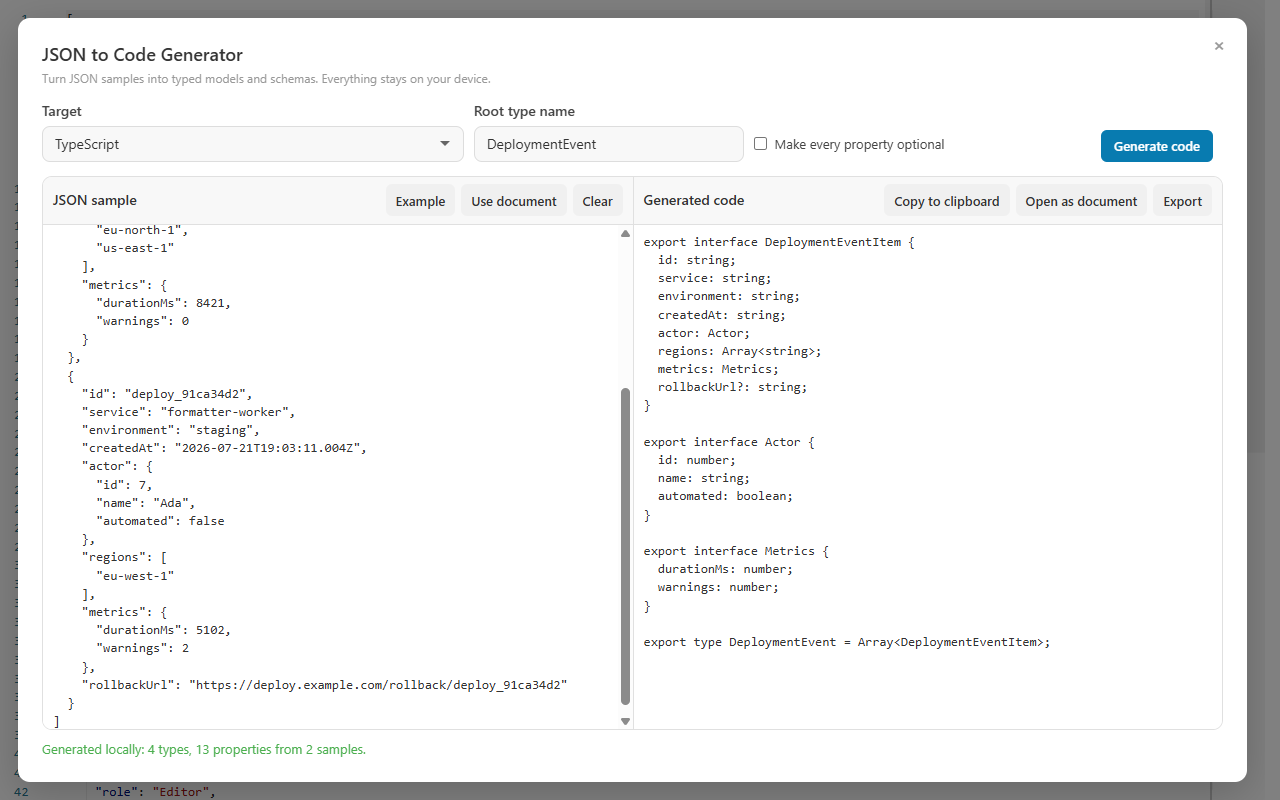
A JSON payload on the left, generated nested TypeScript interfaces on the right — produced locally, never uploaded.
TypeScript output
What the generated TypeScript actually looks like
One sample in, two kinds of declarations out: every object shape becomes a nested exported interface, and the root of the sample becomes an exported type alias. Arrays use the generic Array<T> form, and property names stay exactly as the JSON spells them.
JSON sample
Two customer records with honest gaps
trialEndsAt is an explicit null in one record, referrer is missing from the other, and the second addresses array is empty.
The missing property became optional, the explicit null became a nullable union, and the empty array borrowed its element type from the populated record — with addresses singularized to Address.
The root of your sample is exported as a type alias rather than forced into an interface, so an array root becomes Customer = Array<CustomerItem> and a mixed root can be a union. Keys that are not valid identifiers, such as user-id, are kept as exact source keys — quoted in the interface — so the generated type never breaks the JSON contract. This page covers the TypeScript target in depth; for all eleven targets, read the full JSON to Code Generator guide.
Decision table
How sample evidence becomes TypeScript
Nothing in the output is a stylistic guess — each construct is caused by something observable in the sample. When the root is an array, every record contributes to inference, not just the first one, so the table below reads as a contract: put this in, get this out.
Evidence in the sample
TypeScript result
Why it works that way
A property present in every record
A required property with its inferred type
No record gave evidence that the field can be absent.
A property missing from some records
An optional property marked with ?
Absence in any sampled record is treated as proof the field is conditional.
An explicit null value
A nullable union such as string | null
Null is evidence about the value, not about presence, so it widens the type instead of adding ?.
Different value types under one key
A union of the observed types
TypeScript can express mixed evidence directly, so nothing is flattened into a general type.
An array populated in at least one record
Array<T> with the populated sample's element type
A populated sample always beats an empty one; empty copies only join the informational warning.
An array empty in every record
Array<unknown> plus one informational warning
The safe unknown type is the honest answer when no element was ever observed — all empty arrays are counted into a single warning.
A key that is not a valid identifier, such as user-id
A quoted property with the exact source key
The generated interface keeps the JSON contract instead of quietly renaming the field.
An array property named addresses
An element interface named Address
Array property names are singularized when naming element types.
Input past 5 Mi characters, 100 nesting levels, or 100,000 inspected values
A refusal, not a truncated model
Limits fail closed and never alter the source document; generated output is likewise capped at 16 Mi characters.
Hands-on tutorial
From pasted payload to a committed .ts file
Use the two-record customer sample above, a payload from your own API, or the built-in example. The goal is TypeScript you can defend in code review — where every ? and every | null points back at a record.
Open the generator
Choose More Actions → General tools → JSON to Code Generator, or launch it from the Command Palette. The extension also exposes it from the launcher, and the Windows app lists it under Tools. It is a general tool, so it stays available for every file type — not only JSON documents.
Load a sample
On a JSON document, the open document is loaded automatically the first time, and Use document reloads it whenever you have edited the source. Otherwise paste one strict JSON object, value, or array of records into JSON sample, or press Example to load a two-record sample. Strictness matters: invalid or incomplete JSON reports its line and column when available instead of producing a half-right model.
Choose the target and name the root
Set Target to TypeScript and enter a Root type name that names the domain concept — Customer, not Response. With an array root, that name becomes the exported alias and the element interface is derived from it, so a clear root name makes the whole file readable.
Generate with Ctrl+Enter
Press Ctrl+Enter in the sample box to generate immediately, or let the live output update as you work. The generated code appears beside the sample, so you can check each declaration against the record that caused it without switching windows.
Audit the optional and nullable markers
For each ?, find the record where that property is absent; for each | null, find the explicit null. The generator distinguishes the two kinds of evidence, so if a marker surprises you, the sample — not the generator — is usually what needs another record.
Read the warning line
Empty arrays are counted into one informational warning. If an element came out as unknown, the fix is a trustworthy record where that array is populated — the populated sample's element type wins. Resist pasting made-up data: an invented element type is worse than an honest unknown.
Decide on Make every property optional
For partial-update payloads or endpoints you do not fully trust, enable Make every property optional to mark every generated property with ?. Otherwise leave it off and let the evidence decide — a model where only the genuinely conditional fields are optional is far easier to consume.
Take the result into your project
Use Copy to clipboard for a quick paste, Open as document to inspect the output as its own CodePrettify document, or Export to save a .ts file. Then compile it against real payloads — the TypeScript compiler is the final reviewer, and the generated file gives it something concrete to hold you to.
Before the generated interfaces reach code review
Run through this list once the output looks right — it catches the gaps a quick skim misses.
Every ? in the output traces to a record where that property is absent.
Every | null traces to an explicit null in the sample.
No Array<unknown> remains unless genuinely no populated example exists — and then a comment says so.
The root type name describes the domain concept, and singularized element names like Address read naturally.
Quoted keys such as "user-id" stayed quoted instead of being renamed by hand.
The file compiles against a real payload, not only against the sample that produced it.
Capabilities
What the TypeScript target gives you
Output shape
Nested exported interfaces for every object shape
An exported root type alias
Unions for mixed and nullable evidence
Generic Array<T> syntax, never T[]
Optionality with a reason
Missing from some records → optional ?
Explicit null → union with null
The two are never conflated
Make every property optional when you want blanket caution
Names that keep the contract
Exact source keys, quoted where required
Array names singularized for element types
Your Root type name drives the file
Sample handling
Auto-loads an open JSON document the first time
Use document reloads it on demand
Example loads a two-record sample
Every record of a root array contributes to inference
Actions
Ctrl+Enter generates immediately
Copy to clipboard
Open as document
Export a .ts file
Honest limits, all local
5 Mi characters of input, 16 Mi of output
100 nesting levels, 100,000 inspected values
Limits fail closed and never alter the source
Generation runs entirely on the device
Beyond TypeScript
Switch targets without changing the sample
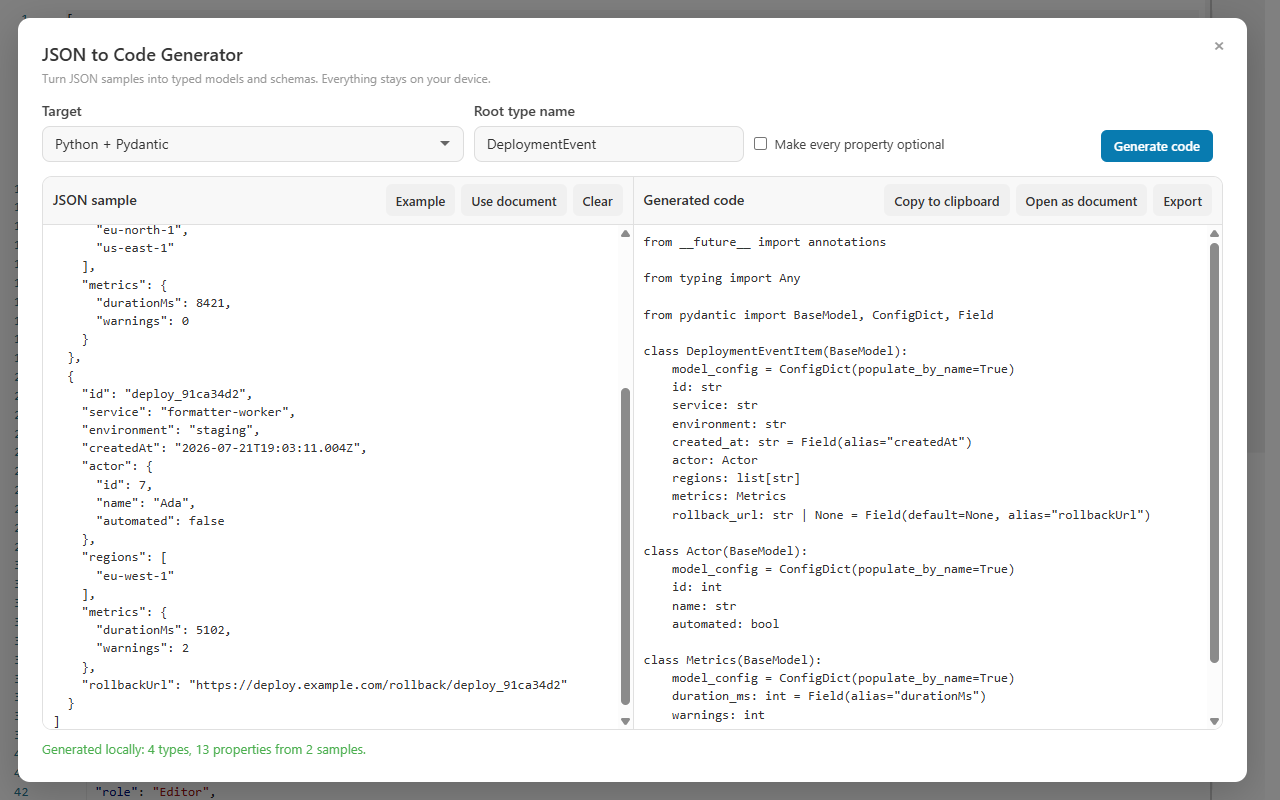
TypeScript is one Target choice among eleven. Pick Python + Pydantic instead and the same sample produces BaseModel classes expressing the same inferred shape — the syntax changes, the evidence does not. The screenshot below is exactly that: the same kind of sample with the Python + Pydantic target selected. For how every target — Zod, C#, Java, Kotlin, Go, Rust, Swift, Dart, and JSON Schema — handles the same inference, read the full JSON to Code Generator guide.
One dropdown change: the Python + Pydantic target expresses the same optional and nullable evidence in Python.
✓
Comparing targets is a review technique, not a gimmick.
Generating the same sample twice — TypeScript for the frontend, Pydantic or C# for the service behind it — is a fast way to spot where the two ends of your pipeline disagree about optionality before the disagreement becomes a production bug. Both generations happen locally from the same pasted sample.
FAQ
JSON to TypeScript questions
Does JSON to TypeScript output interfaces or type aliases?
Both. Every object shape becomes a nested exported interface, and the root of the sample is exported as a type alias, which is how an array or union root is expressed accurately. Generated arrays always use the generic Array<T> syntax rather than T[].
How is an optional field different from a nullable field?
They come from different evidence. A property missing from some records in an array sample becomes optional and gets a question mark, while a property holding an explicit null becomes a nullable union such as string | null. The generator distinguishes the two instead of merging them into one loose type.
Does the generator upload my JSON anywhere?
No. Generation runs entirely on your device in the Chrome and Edge extension and in the Windows app, and no account is required. The sample and the generated TypeScript never leave the machine.
How do I get a real element type for an empty array?
Include at least one record where the array is populated — a populated sample's element type always wins over empty occurrences. When no sample populates the array, the element falls back to the safe unknown type, and all empty arrays are counted into a single informational warning rather than an error.
Generate the interfaces your payload already proves
Open the JSON, generate nested TypeScript interfaces locally, and commit types where every question mark has a reason. Free, no account, nothing uploaded.