Convert JSON to Pydantic models that keep your exact keys
Paste one or more JSON records, pick the Python / Pydantic target, and get BaseModel classes generated on your device: snake_case field names, a Field alias wherever the name differs from the source key, nested objects promoted to named models, and Optional types you can trace back to the evidence. No upload, no account, free.
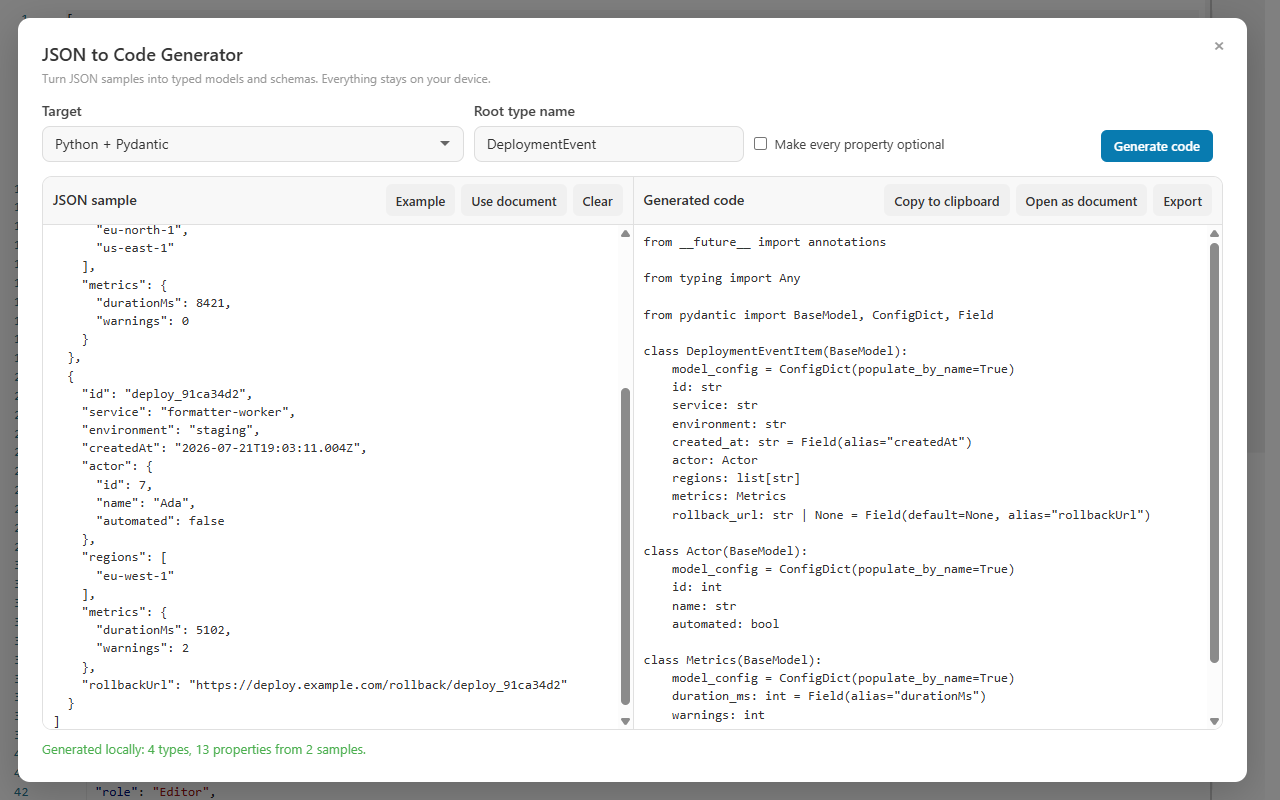
Deployment-event JSON beside its generated Pydantic models — camelCase keys such as durationMs become snake_case fields with aliases.
Aliases
Pythonic names without breaking the JSON contract
Most APIs speak camelCase; Python speaks snake_case. A converter that simply renames fields breaks parsing, and one that keeps camelCase produces Python nobody wants to read. The Pydantic target does both jobs: field names follow Python convention, and a Field(alias="...") carries the exact source key whenever the two differ — for camelCase keys, invalid identifiers, and reserved words alike.
JSON sample
Two account records with real variation
The first record carries an explicit null and a populated teams array; the second adds inviteCode, which the first never mentions, and leaves teams empty. Three different kinds of evidence in eleven lines.
Representative output: teams is singularized into a Team model, and both records feed the account model — the empty array does not erase the element type the first record proved.
class Team(BaseModel):
    team_id: int = Field(alias="teamId")
    role: str

class Account(BaseModel):
    user_id: int = Field(alias="userId")
    display_name: str = Field(alias="displayName")
    is_admin: bool = Field(alias="isAdmin")
    last_login_at: Optional[str] = Field(alias="lastLoginAt")
    teams: List[Team]
    invite_code: Optional[str] = Field(alias="inviteCode")
i
Missing is not the same as null.
Inference tracks the two separately: a property absent from some records becomes Optional, while an explicit null becomes a nullable type. Here lastLoginAt is nullable because record one says so, and inviteCode is optional because record one never mentions it. That distinction is evidence you can act on when you review the model against the real API contract.
Hands-on tutorial
From pasted sample to a working .py file
Use the account sample above or a payload from your own API. The goal is a model whose every annotation you can justify by pointing at the sample.
Open the generator where you already are
JSON to Code Generator is a general tool: find it under More Actions → General tools, in the Command Palette, in the extension launcher, or in the Windows app's Tools menu. Opened on a JSON document, the sample loads automatically the first time, and Use document reloads the current document whenever you want a fresh copy.
Give it evidence, not one perfect record
Paste an array of representative records into JSON sample — or press Example to explore with built-in data first. When the root is an array, all entries contribute to inference rather than only the first, which is exactly what lets Optional and nullable types emerge from real variation.
Pick the target and name the root
Choose Python / Pydantic in the Target list and set the Root type name to the domain concept — Account, not Response or Data. Python needs no package or namespace field; that extra control appears only for C#, Java, Kotlin, and Go.
Generate and read the whole result
Press Ctrl+Enter in the sample box to generate immediately, then review the live generated code and any inference warning before touching anything else. The warning is not noise — it is the generator telling you which part of the model it could not prove.
Trace every alias to a source key
Each camelCase key becomes a snake_case field with Field(alias="...") holding the exact original key; keys that are already valid snake_case stay plain fields with no alias. Reserved words and invalid identifiers get a safe field name the same way, so the JSON contract itself is never rewritten.
Audit the Optional story
Confirm that invite_code is Optional because one record omits it and that last_login_at is nullable because of the explicit null. Empty arrays are counted into a single informational warning, and the safe unknown element type appears only when no sample ever populates the array — a populated sample's element type wins.
Decide about Make every property optional
Enable Make every property optional only when the payload really is sparse — partial updates, patch bodies, incremental exports. It goes beyond decoration: nullable and defaulted forms are used where the target needs them. For a full-record API response, leave it off and let the evidence decide.
Ship the result and test it against real payloads
Use Copy to clipboard, Open as document to keep working inside CodePrettify, or Export to save the file with the suggested .py extension. Then parse a few production payloads with the model — domain validators, date parsing, and version-specific Pydantic configuration still belong to your project.
Prove the inference to yourself
Regenerate after each single change and diff the output — the fastest way to learn what the generator treats as evidence.
Search the sample for every alias string in the output — each one must match a real source key exactly.
Add inviteCode to the first record too, regenerate, and watch the field stop being Optional.
Replace the null in lastLoginAt with a timestamp and compare the annotation before and after.
Empty both teams arrays and read the informational warning plus the safe unknown element type.
Rename a key to a Python reserved word such as class and inspect the safe field name with its alias.
Toggle Make every property optional and diff the two generated versions line by line.
Capabilities
What the Python / Pydantic target does for you
Naming that respects both sides
snake_case field names throughout
Field alias whenever the name differs from the key
camelCase, invalid identifiers, reserved words covered
The JSON contract is never rewritten
Optionality you can defend
Missing property → Optional
Explicit null → nullable type
The two kinds of evidence stay distinguished
Make every property optional for sparse payloads
Structure that scales
Nested objects become named models
Plural array names singularized — teams yields Team
Array roots merge every record into inference
Compatible shapes merge; mixed values get unions or a safe general type
Warnings instead of guesses
Empty arrays counted into one informational warning
Safe unknown element type only when never populated
Invalid JSON reports line and column when available
Hard limits, fail closed
Input capped at 5 Mi characters
Output capped at 16 Mi characters
Nesting to 100 levels, 100,000 inspected values
The source document is never altered
Both products, always local
Extension launcher and Windows app Tools menu
Example data and Use document loading
Ctrl+Enter to generate immediately
Copy to clipboard, Open as document, Export
Switch targets
Keep the sample, swap the language
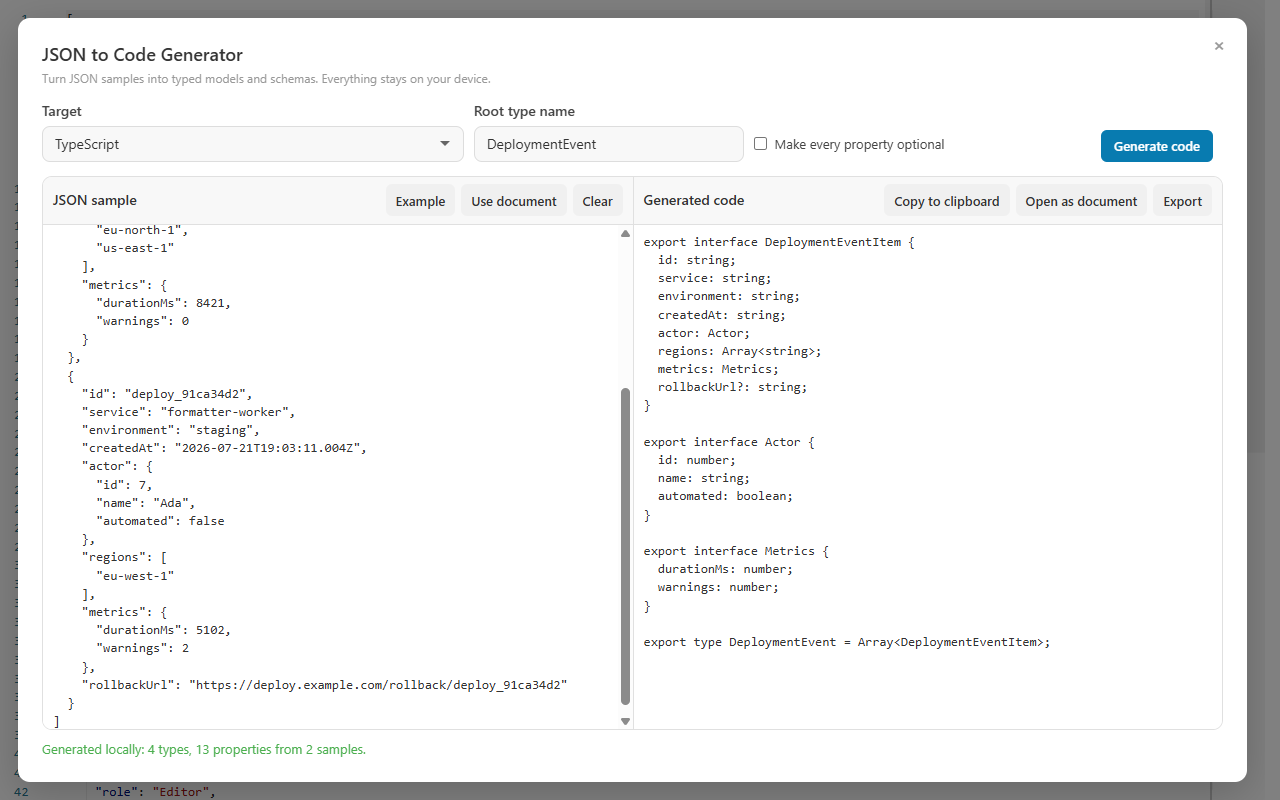
The same inference engine drives every output target, so switching the Target list from Python / Pydantic to TypeScript changes the syntax — not the shape. Where Pydantic uses an Optional field with an alias, TypeScript marks the property with ? and keeps the exact source key. Comparing two targets from one sample is the quickest sanity check that a surprising annotation came from your data, not from the language.
Same deployment sample, TypeScript target — nested interfaces where Pydantic produced nested BaseModel classes.
Eleven targets share this behavior — TypeScript, Zod, JSON Schema, C#, Java, Kotlin, Go, Rust, Swift, Dart, and Python / Pydantic. The JSON to Code Generator guide covers preparing samples and reviewing inference across all of them, and the JSON to TypeScript guide walks the front-end side of the same workflow.
Output review
Read the generated model like a report
Every annotation in the output is a claim about your sample. This table maps each claim back to its evidence — and to the question you should still ask.
In the generated Python
Why it happened
What to verify
A plain field with no alias
The key is already a valid snake_case identifier.
Nothing to map — the field name and the JSON key are identical.
A field with Field(alias="...")
The source key is camelCase, an invalid identifier, or a reserved word.
That your parsing populates models by alias so the original payload keeps loading.
An Optional field
At least one sampled record omitted the property.
Whether absence is genuinely allowed, or your sample mixed partial and full records.
A nullable type
The sample contained an explicit null for that property.
Whether null is domain-meaningful or dirty data to reject upstream.
A safe unknown list element type
The array was empty in every sample, reported in one informational warning.
Add one record with a populated array — its element type wins over the unknown.
A model named Team from a teams key
Plural array property names are singularized for element model names.
That the generated name matches your domain vocabulary; rename it if not.
Generation refuses the sample
A limit was hit: 5 Mi input, 16 Mi output, 100 nesting levels, or 100,000 values.
Limits fail closed and never alter the source — trim the sample to a representative slice.
FAQ
JSON to Pydantic questions
Which Pydantic version do the generated models target?
The generator emits standard Pydantic building blocks — BaseModel classes with Field aliases — and does not pin a specific Pydantic version. Compile the output against the Pydantic release your project uses, and add version-specific configuration, validators, and model settings yourself.
Why are field names snake_case instead of matching my JSON keys?
Python convention is snake_case, so the generator renames fields and attaches a Field alias carrying the exact source key whenever the two differ — for camelCase keys, invalid identifiers, and reserved words alike. The JSON contract lives in the alias, so parsing the original payload keeps working.
Is my JSON sample uploaded to a server?
No. Generation runs entirely on the device in both the browser extension and the Windows app. The sample, the generated Python, and everything in between stay on your machine.
How do multiple sample records improve the generated models?
When the root is an array, every record contributes to inference instead of only the first. A property missing from some records becomes Optional, an explicit null becomes a nullable type, and compatible shapes merge into one model — so a few varied records produce more honest models than one perfect record.
Open the JSON you trust, choose Python / Pydantic, and leave with BaseModel classes whose aliases carry the exact source keys — generated free, on your own device.